Reviewing applications
A business application does not create an account. The account is created only when you approve it, so nobody can sign in as a business before you have checked them.
When an application arrives
- You receive an email notification.
- The TT B2B Perks menu and the Customers item show a count badge.
- The application appears on the Dashboard, at the top of Customers › All customers and under Customers › Applications.
Approve an application
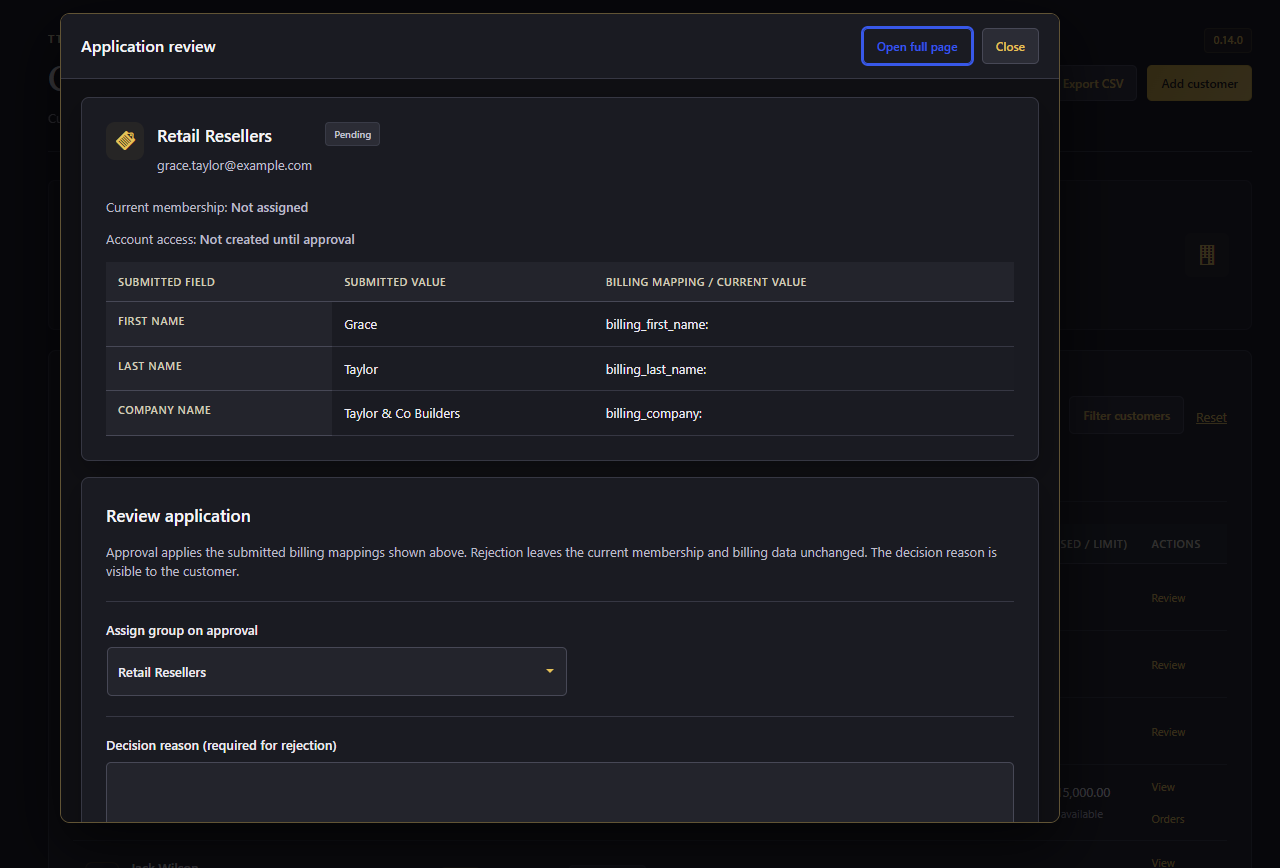
- Select the application row. A review popup shows the submitted details and files. The full review page is still available from the popup.
- Choose an active Group. The form's default approval Group is preselected when one is set.
- Select Approve & create account.
- The plugin creates a WooCommerce customer, applies the Group, activates the account and emails the applicant an approval message with a link to set their password.
Existing customers keep their account. A signed-in customer who applies to upgrade keeps their password and access. Approving them only adds the Group.
Reject an application
Choose Reject and enter a reason. A reason is required. Rejected applicants without an account never get one; an applicant who signed in to apply keeps their ordinary customer account.
For an account made through Add customer, approval activates that account with its existing password. Rejection leaves it locked.
When something fails
If account creation, activation or the email fails, the application shows the problem and can be retried. A partly created account stays locked until approval completes. You can also resend an expired or failed password setup link from the review page; a new link replaces the old one.
Retries only reuse the account created for that application. An unrelated account with the same email is never taken over.
Who can apply
- Guests apply with an email address that is not yet registered.
- Existing customers sign in first, then submit an upgrade application.
- Store managers can submit the form on behalf of an applicant. The application is keyed to the email entered, not to the manager's account.
Repeated anonymous submissions are rate limited.