License plans
Catalog mode works on the Free plan. A Basic license adds customer targeting, enquiries and Global Design.
Compare plans
| Feature | Free | Basic |
|---|---|---|
| Catalog mode for everyone | Yes | Yes |
| All products, or selected products and categories, with exclusions | Yes | Yes |
| Hide prices and set the not-for-sale message | Yes | Yes |
| Customer targeting: guests only, selected roles or selected customers | — | Yes |
| Enquiry: product enquiry form, Contact Form 7 mode and enquiry list | — | Yes |
| Changing the Global Design | — | Yes |
Activate a license
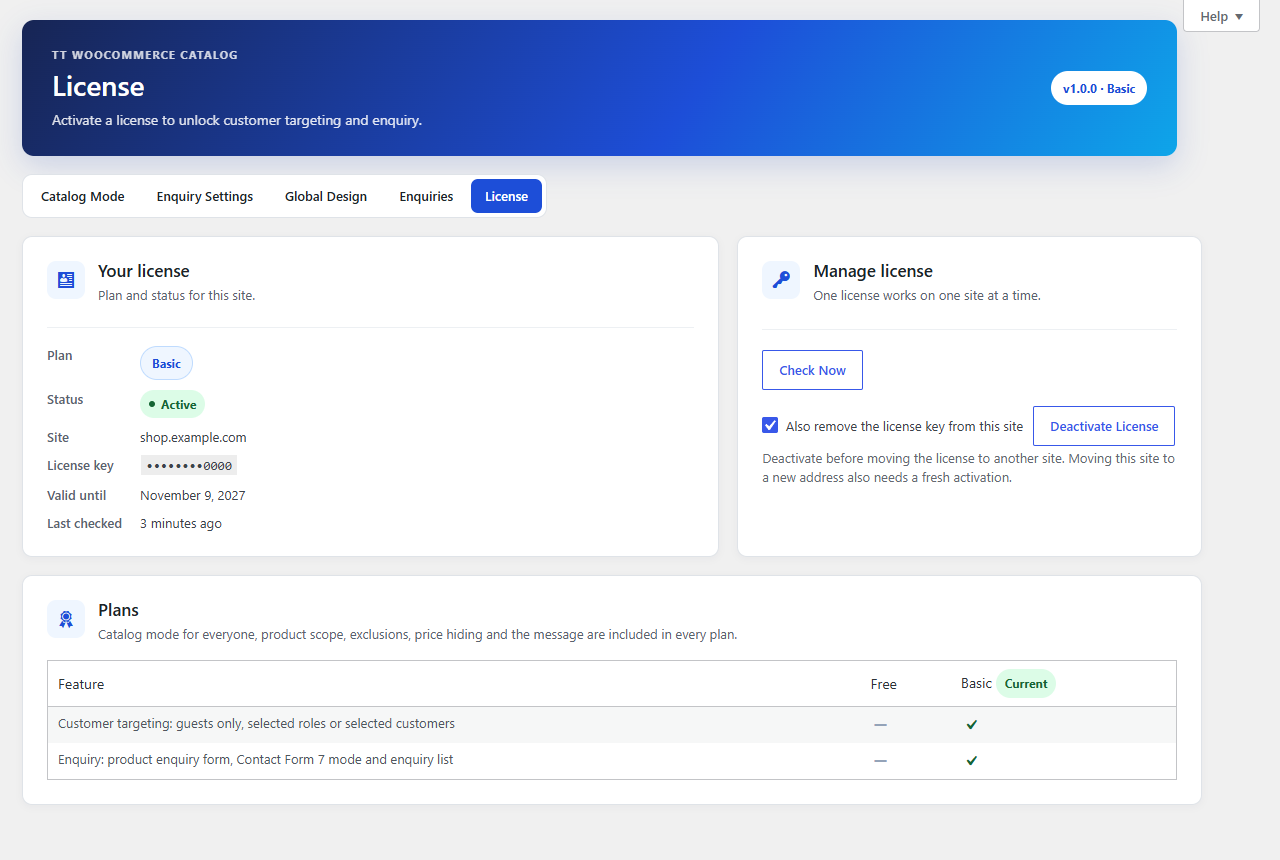
- Open TT Catalog › License.
- Paste the license key from your license email and click Activate License.
- The page shows your plan, status, site, the last characters of the key, the end date and the last check.
A license works on one site address at a time and is re-checked automatically. Check Now refreshes it. To move it, click Deactivate License on the old site first.
If the license lapses
Settings saved on Basic keep working until you change them. Without Basic you can only switch customer targeting back to Everyone and switch enquiries off; other Basic settings are locked. The current design stays in use.
Privacy. The plugin contacts the Tantech licensing service only when a license key is entered, and sends only the key, the product code and your site's domain.