License plans
TT Permission Control runs on the Free plan without a license. A Basic license adds shop manager accounts and single sub-page rules.
Compare plans
| Feature | Free | Basic |
|---|---|---|
| Restrict administrators | Yes | Yes |
| Restrict whole top-level admin menus | Yes | Yes |
| Restrict toolbar items | Yes | Yes |
| Custom access denied message | Yes | Yes |
| Restrict shop manager accounts | — | Yes |
| Restrict single sub-pages inside a menu (for example WooCommerce › Settings) | — | Yes |
Activate a license
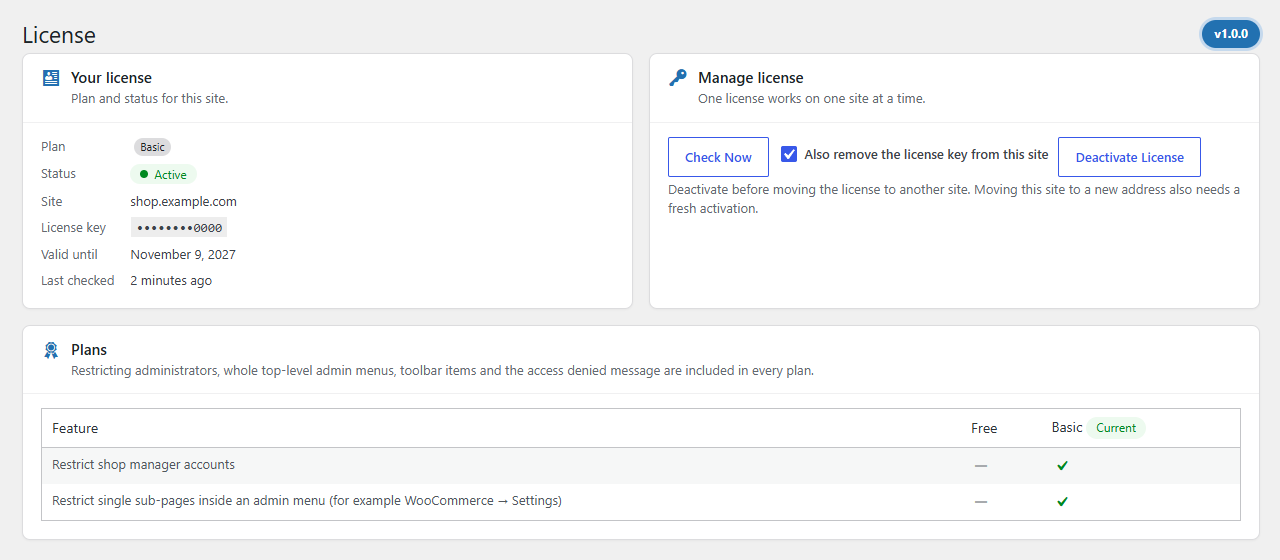
- Open TT Permission Control › License.
- Paste the license key from your license email and click Activate License.
- The page shows your plan, status, site, the last characters of the key, the end date and the last check.
A license works on one site address at a time and is re-checked automatically. Check Now refreshes it immediately. To move it, click Deactivate License on the old site first; tick Also remove the license key from this site to delete the stored key too.
If the license lapses
Rules saved on Basic keep working: shop managers and sub-pages you restricted stay restricted, so nobody regains access because a license expired. On the Free plan those rules can only be removed, not added or extended.
Privacy. The plugin contacts the Tantech licensing service only when a license key is entered, and sends only the key, the product code and your site's domain.